
 PocketArC
My iTerm2 tabs turn red when Claude Code is waiting for me.
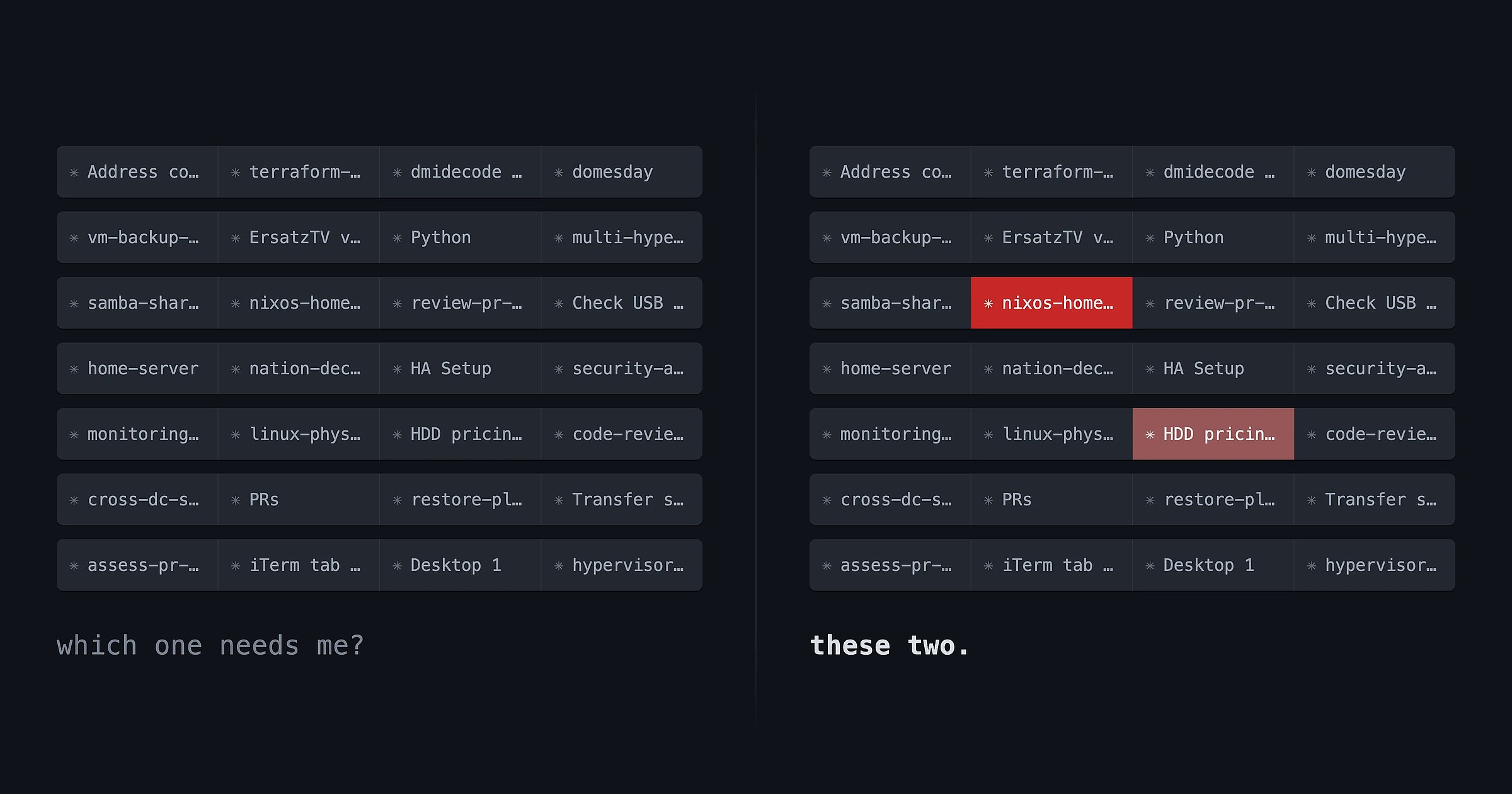
I keep a lot of Claude Code sessions open at once. I realized that a big inefficiency right now is that oftentimes sessions can sit there for minutes waiting for me to provide input. If a session is blocked pending my answer for 5 minutes, and that happens multiple times over all your ongoing sessions in a given day, that's a lot of hours wasted.
The problem though is that there isn't a good indicator of "Claude's waiting for you!" that I can tell. Yes there's the little asterisk icon, but come on, that's not visually clear enough, especially because several of the sessions can end up parked waiting on another related session to end (since it's touching the same files or resources). So I often would just click through the tabs one by one, see where they are, keep up with them. Inefficient. And there's no visual indicator that "hey! this tab is waiting for you now". There are the macOS notifications, but those are incredibly spammy and totally useless to me, because I'll get 5 and then it's like "well... which tabs are they for?". Pain.
I wanted to see the state in the tab instead. Big bright red when Claude needs me, normal when it doesn't.

It works, and it took almost no code at all to do.
The easy part
iTerm2 has an escape sequence for tab color, one per channel:
printf '\033]6;1;bg;red;brightness;200\a'
printf '\033]6;1;bg;green;brightness;40\a'
printf '\033]6;1;bg;blue;brightness;40\a'
And to put it back:
printf '\033]6;1;bg;*;default\a'
Run that in a tab and the tab will go red. There's no API to call and no plugin to install. Easy.
Hooks can't just print things
Claude Code has hooks1, which are just shell commands that it'll run when certain things happen:
Notificationfires when it's asking for permission or has gone idle waiting for an answer to a question.Stopfires when it finishes a turn and is waiting for you to respond.UserPromptSubmitfires when you send a message.
So the hook just runs that printf, right? Nope. Claude captures a hook's stdout, because for some hooks stdout is fed back into the conversation. An escape sequence printed there just gets swallowed, so we have to write straight to the terminal device instead. Except:
# ...but run from inside the hook, not from your own shell:
printf '\033]6;1;bg;red;brightness;200\a' > /dev/tty
zsh: device not configured: /dev/tty
The hook runs as a child of the claude process, it's not actually in our terminal. What it does inherit is ancestry. So you can walk up the process tree until you hit something that is in our terminal:
tab_session_owner() {
    _pid=$$
    while [ "$_pid" -gt 1 ]; do
        _tty=$(ps -o tty= -p "$_pid" 2>/dev/null | tr -d ' ')
        case "$_tty" in
            '' | '??') ;;
            *)
                echo "$_pid $_tty"
                return 0
                ;;
        esac
        _pid=$(ps -o ppid= -p "$_pid" 2>/dev/null | tr -d ' ')
        [ -n "$_pid" ] || return 1
    done
    return 1
}
That ends up on the claude process, which makes sense: the hook was spawned without a controlling terminal, but claude itself was started by the shell sitting in the tab, so it's the first ancestor up the chain that still has one. With that we get two useful things: /dev/ttys001 to write to, and the PID.
Which is the whole trick, really:
owner=$(tab_session_owner) || exit 0
pid=${owner% *}
device="/dev/${owner#* }"

printf '\033]6;1;bg;red;brightness;200\a' > "$device"
And of course since every tab is running a separate Claude Code process, we get the ability to paint every tab with the above.
The tmux problem that wasn't
I run a lot of these sessions inside tmux, which I thought would be a very different beast (it's not directly in the terminal, not like a raw claude process). BUT. Tmux's iTerm2 control mode (tmux -CC), where each tmux window becomes a real native iTerm2 tab instead of being drawn inside one, allows the sequence to work. The iTerm/tmux integration is easily one of my favorite iTerm features.
Two kinds of waiting
There's a difference between "Claude is waiting for an answer and can't continue without me" and "Claude finished its turn, and now it's my go." The first one is my fault: I wandered off and left a job halfway. The second one can sit there all day without costing me anything.
So there are two colors. Notification paints the tab red when Claude is blocked, Stop paints it amber when Claude is done.
That way I can triage things a bit better. This doesn't really matter, it's way overkill to have multiple colors, but it's fun.
How to deal with paused/parked sessions
Hooks are events. A session that's sitting there blocked isn't generating events; that's what "blocked" means. So a tab that went red at 11 PM is still red at 9 AM, and after a few days it'll still be red. It needs my attention, but maybe it's parked because whatever it was doing needs something else to finish first, because it'll conflict2.
So I added decay. Twelve hours of ignoring something means that clearly I've decided not to deal with it for now, so the color should go away on its own until it's picked back up. I made a launchd agent to keep track of decay and automatically clear the tab color. Each hook writes one line per terminal device:
blocked 1787400533 60674State, timestamp, PID. Then a sweeper runs every five minutes, works out how old each pause is, and interpolates the color toward neutral gray:
tab_rgb() {
    case "$1" in
        blocked) _r=200 _g=40  _b=40 ;;
        done)    _r=190 _g=140 _b=30 ;;
        *) return 1 ;;
    esac

    _age=$2
    [ "$_age" -lt 0 ] && _age=0
    [ "$_age" -ge "$TAB_FADE_SECONDS" ] && return 1

    echo "$((_r + (TAB_NEUTRAL - _r) * _age / TAB_FADE_SECONDS)) $((_g + (TAB_NEUTRAL - _g) * _age / TAB_FADE_SECONDS)) $((_b + (TAB_NEUTRAL - _b) * _age / TAB_FADE_SECONDS))"
}
Fresh red is urgent, washed-out pink has been there a while, and at twelve hours it resets to default. I can now read how long something's been waiting based on its color, which is pretty neat.
Answering a question isn't sending a message
I made the color clear on UserPromptSubmit, which is the obvious choice. I've replied, so I'm engaged, so clear it.
It worked for messages, but it turns out questions work differently. Question answers aren't a message submission. Same with approving permission prompts. UserPromptSubmit never fires, so nothing clears, so the tab stays red while Claude carries on working.
The fix was PostToolUse. A question prompt is itself a tool call, so answering it lets the tool complete, and fires the hook. That's... it.
P.S. The status line
I've also made changes to the status line that I'm just gonna roll into this little post because there's really no need for two separate posts for this. Claude Code lets you replace the status line with a command. The command gets the session state as JSON on stdin and prints one line:
printf '%s' "$input" | jq -r '.model.id // "", .model.display_name // "", (.workspace.current_dir // .cwd // "")'
Mine styles the model to let me know when I'm using a different model than my default (great for highlighting when I'm on Fable or an older version of Opus, just for my awareness and to remind me to switch if I didn't mean it). Opus 5 with the 1M context window is my configured default3, so no custom color:

Anything else gets a colored pill (different colors for different models):

case "$haystack" in
  *opus*)   bg="167;139;250"; fg="26;16;46"   ;;
  *sonnet*) bg="96;165;250";  fg="8;24;48"    ;;
  *haiku*)  bg="74;222;128";  fg="6;38;20"    ;;
  *fable*)  bg="251;191;36";  fg="48;32;4"    ;;
  *)        bg="248;113;113"; fg="45;8;8"     ;;
esac
The badge means "you're not on your default model"4. Same rule as the tabs: the normal state is invisible, and color always means something needs attention.
2026 and I'm selling you on terminal colors. I'm sure those who worked with computers ~50 years ago are rolling their eyes at this "discovery".
Anyway. The whole thing lives in ~/.claude/, and I've put it up at pocketarc/agent-tab-colors so you can steal it. There's an installer, so it's one command. If you run more Claude sessions than you can keep in your head, it's worth it.
How do you keep track of your sessions? I can't be the only one running more of these than fit in my head, and I'd genuinely like to know if others have come up with something better than painting the tabs. If you've built something, or you want this working in Ghostty or WezTerm, I'm always excited to talk about this stuff, so feel free to reach out to me directly either on X/Twitter @pocketarc or by email.
Footnotes
-
I think this was my first time playing with Claude Code hooks, besides a weird exploration of Honcho, which I immediately turned off because I don't actually want Claude Code having memory. ↩
-
I end up in those situations a lot, as I keep going in different directions and coming up with different ideas to continue exploring, and want to do them in separate chats with separate plans. ↩
-
Despite how unbearable its writing is. I've gotten so exhausted with the way it writes that I've literally created a text shortcut on macOS that outputs "Do you need anything from me? If so, AskUserQuestion. If not, do whatever you need to do to move this forward." So when it vomits a whole page of dense writing at me, I have a way to deal with it. It feels really dumb that I'm in this situation, but my god it's impossible to keep up with the word vomit, it's just so much. ↩
-
I especially need it for when I use Fable, because switching to Fable and then opening another Claude Code session ends up with me using Fable for that session as well, accidentally, and the next thing I know, I've burned through my Fable limits. This fixes it. ↩